Construction scheduling software by Gantt Planning
Construction scheduling built to stand up to scrutiny.
Gantt CSS is desktop planning software for construction. Build and update critical-path programmes to the working day, keep every baseline, and turn lost time into delay analysis that follows your contract.
- Windows desktop
- Works offline
- P6 XER and MS Project XML in and out
- Critical path to the working day
- Double links
- South African public holidays
- Builders’ break
- Baselines and updates
- Progress line
- Resource histograms
- S-curves
- Earned value
- DCMA-style checks
- P6 XER in and out
- MS Project XML in and out
- JBCC PBA
- GCC 2015
- NEC3 and NEC4
- FIDIC 1999 and 2017
- Windows analysis
- Time impact analysis
- Collapsed as-built
- A4 to A0 and PDF
Made by planners
Gantt Planning is a South African construction planning consultancy. We build, update and analyse programmes for clients, and Gantt CSS is the software we wrote to do that work.
It schedules exactly, keeps the record of every change, and reads and writes the files your clients and contractors already use.
A programme is only as good as the logic behind it, the calendar under it, and the record of how it changed.
- 01
Exact scheduling
Logic, lags and calendars worked out to the working day, the way planners check them by hand.
- 02
A record of change
Every baseline and progress update is kept, so you can show what moved, when and why.
- 03
Local by design
Programmes are files on your own computer, and the software keeps working offline.
Capabilities
The Planning module covers the full life of a construction programme. Each part was built and checked against how planners actually work.
Critical-path scheduling
Forward and backward passes to the working day, with float, constraints and the longest path.
- Finish-to-start, start-to-start and finish-to-finish links with leads and lags
- Double links for overlapping work
- As late as possible, constraints and multiple float paths
Calendars that know South Africa
Work weeks, hours per day, public holidays, the builders’ break and site shutdowns.
- South African public holidays generated per year
- Shutdowns and single days off
- A calendar per activity
Baselines and updates
Keep every baseline and progress update, draw up to three baselines at once and see each slip in working days.
- Move the data date and record actuals
- Compare any two versions side by side
- Progress line and variance columns
Resources, curves and earned value
Histograms by day, week or month, S-curves with early and late envelopes, planned progress and earned value.
- Over-allocation shown against limits
- Planned, forecast and actual progress
- SPI, SV and earned schedule
Schedule quality checks
DCMA-style checks with findings in plain language, before the programme goes to the client.
- Open ends, lags, constraints and float
- Missed activities and baseline execution
- Filters straight to each finding
Print, PDF and Excel
Print A4 to A0 or PDF with title blocks and logos, and export workbooks with real Excel dates and numbers.
- Pages across or fit to width
- Histograms and S-curves on the sheet
- Print sets for the monthly report
One product, module by module
- PlanningIn use
Programmes, logic, calendars, progress, baselines, resources, contract registers and delay analysis.
- EstimatingNext
Bills of quantities, price codes, resources and rates, markups and analysis.
- Commercial controlPlanned
Bill-to-programme links, valuations, forecasts, earned value and cash flow.
- Site and subcontractsPlanned
Subcontracts and adjudication, drawing register and materials received.
Why Gantt CSS
Most scheduling tools stop at the bar chart. Gantt CSS carries on to the notice, the claim and the analysis behind it.
- contract forms set up
- 6contract forms set upJBCC PBA, GCC 2015, NEC3, NEC4, FIDIC 1999 and 2017
- delay analysis methods
- 4delay analysis methodsWindows, time impact, as-planned vs as-built, collapsed as-built
- programme formats read
- 4programme formats readP6 XER, MS Project XML, Candy and Excel
- baselines on screen at once
- 3baselines on screen at onceEach in its own colour, on screen and in print
Delay analysis built in, not bolted on
Registers for early warnings, notices of delay, compensation events and extension-of-time claims, linked to the programme. Run windows analysis, time impact analysis, as-planned versus as-built and collapsed as-built, then issue one combined EOT report as a PDF.
- Windows analysis
- Time impact analysis
- As-planned vs as-built
- Collapsed as-built
Set up for the contracts you sign
Contract set-up for JBCC PBA, GCC 2015, NEC3, NEC4, FIDIC 1999 and FIDIC 2017. Time bars and deemed acceptance are counted in working days on the contract calendar, with rules you can edit. Weather days are set against the monthly allowance.
- JBCC PBA
- GCC 2015
- NEC3 and NEC4
- FIDIC 1999 and 2017
Exact with the files you already have
Opens and writes Primavera P6 XER and Microsoft Project XML, reads CCS Candy planning programmes and Excel workbooks, and keeps dates, durations, lags and calendars as they are. Updating from a file lists every change before anything changes.
- P6 XER
- MS Project XML
- Candy programmes
- Excel
Your programmes stay on your desk
A Windows desktop application that works offline. Programmes are saved as files on your computer or network, never uploaded, and each user’s licence runs on two PCs.
- Windows
- Offline
- Files on your PC
Live programme
A small building programme, scheduled in your browser with the same forward and backward pass Gantt CSS runs. Apply a delay and see whether it uses float or moves completion.
Apply a delay or an acceleration
- Practical completion
- 12/07/27
- Against baseline
- ±0 d
- Critical
- 9 of 12
Critical path Has float Total float Baseline Planned progress Data date
A simplified demonstration with finish-to-start links on a five-day week. Gantt CSS itself handles every link type, calendars and progress.
Screens
Six screens from Gantt CSS itself. Drag through them, let them play, or open any one full screen and zoom in.
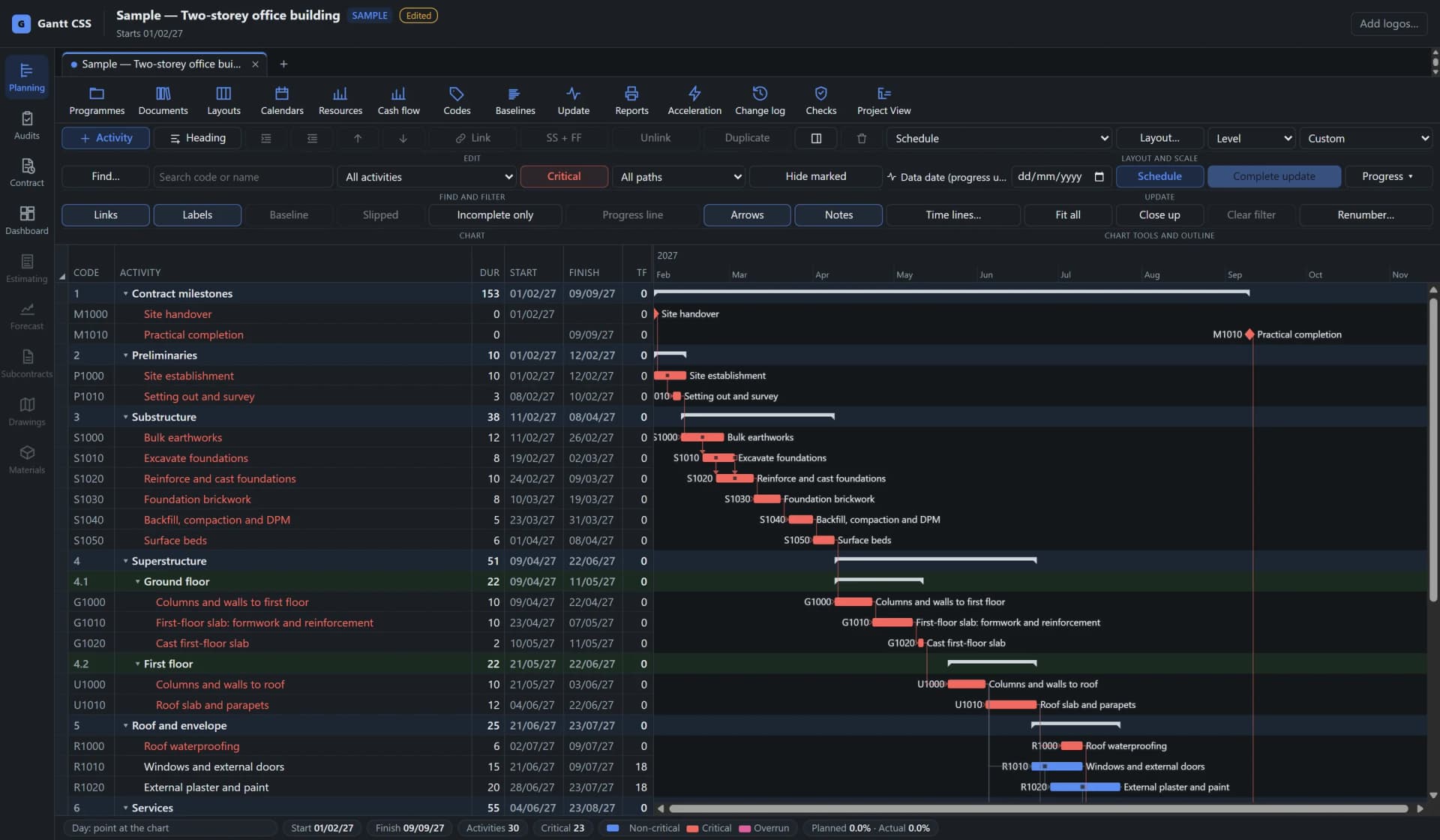
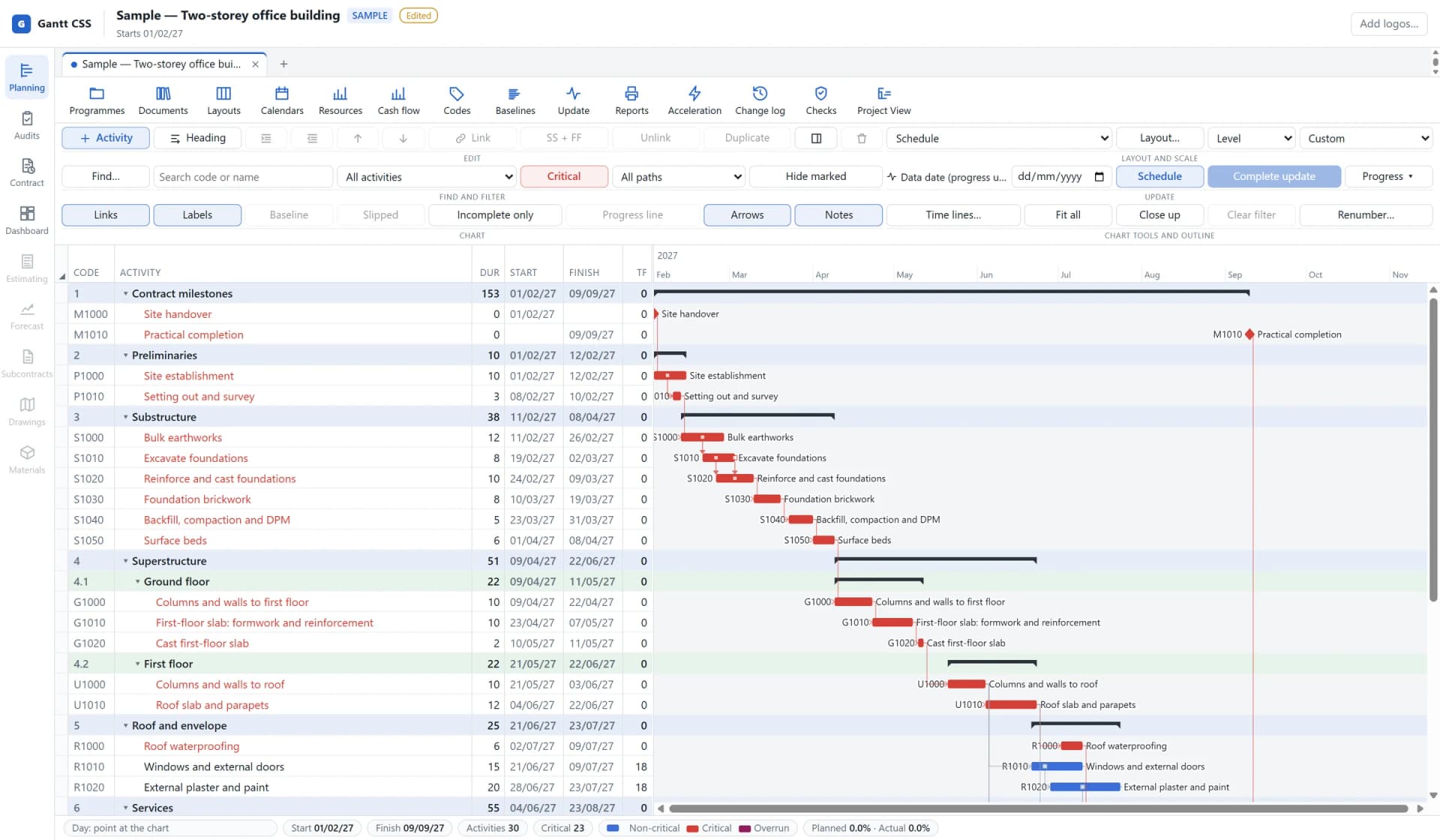
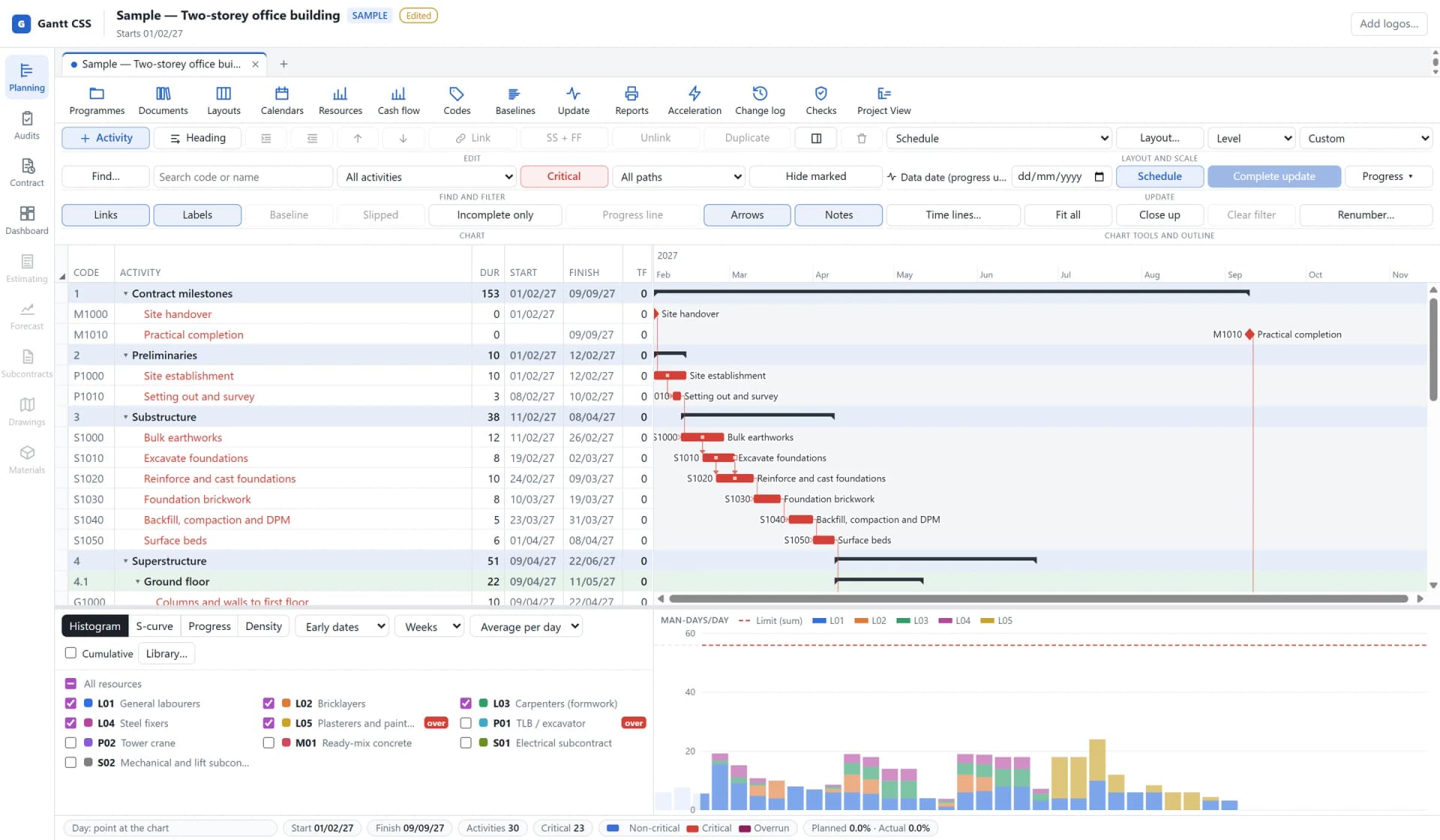
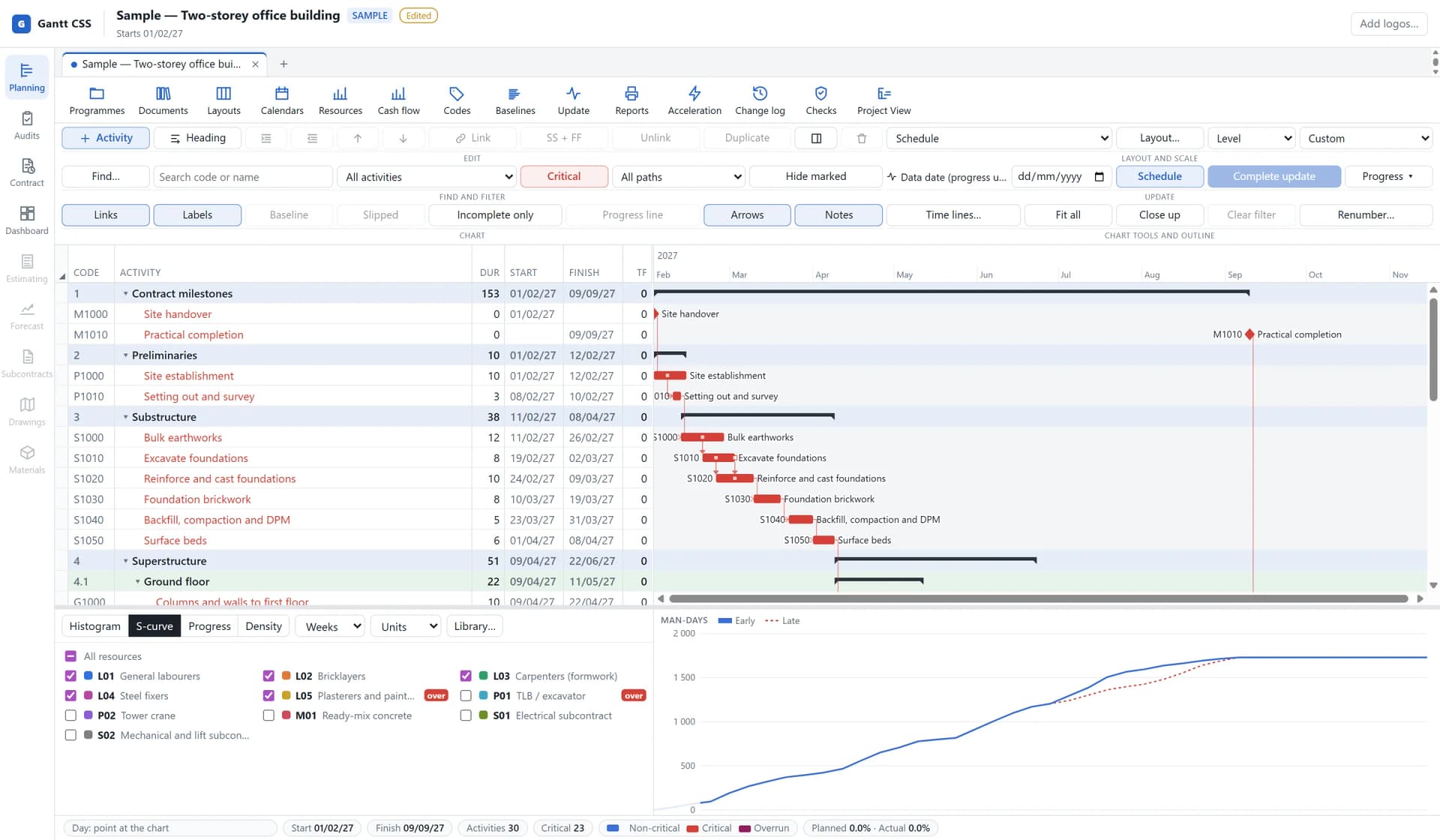
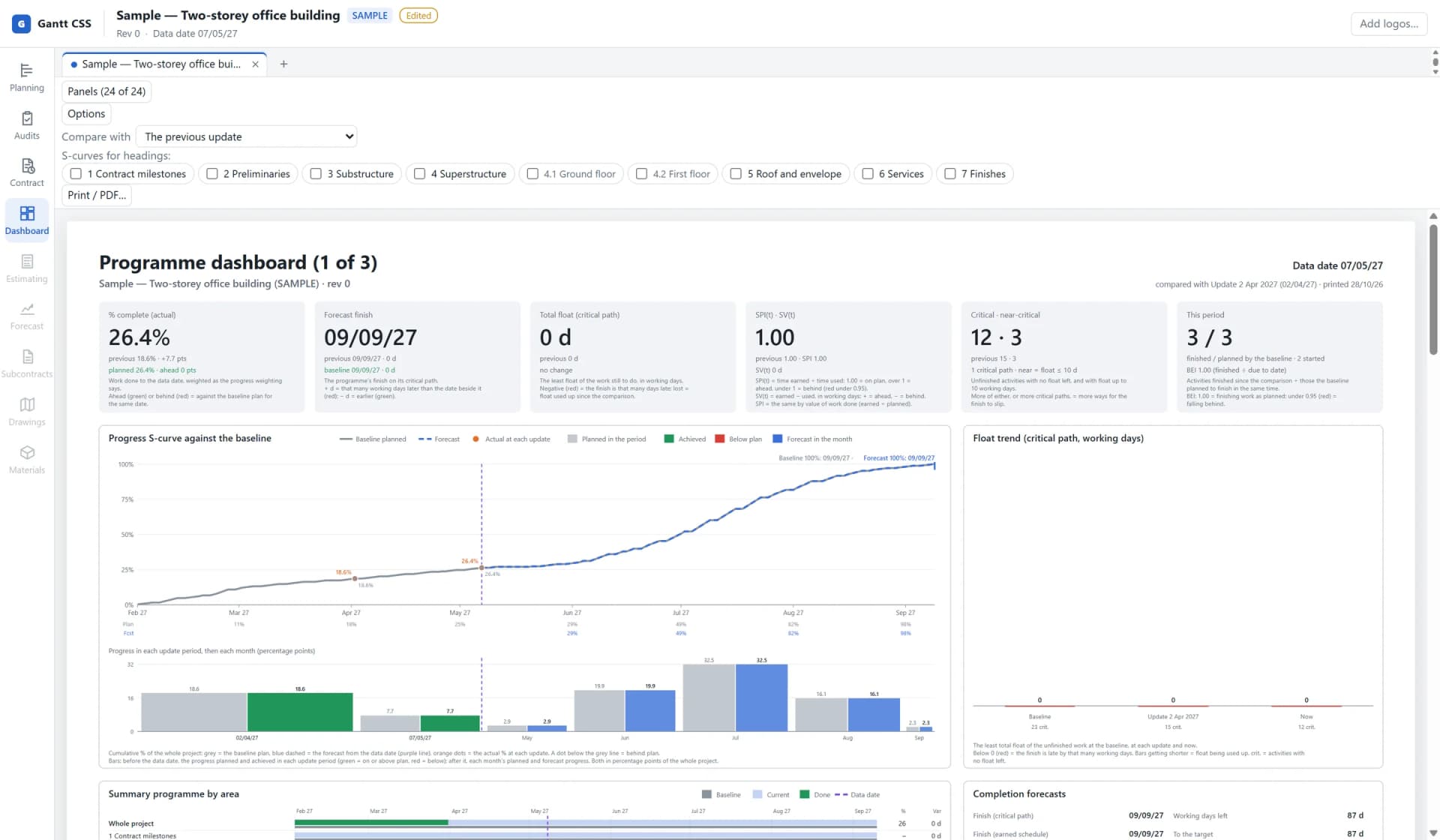
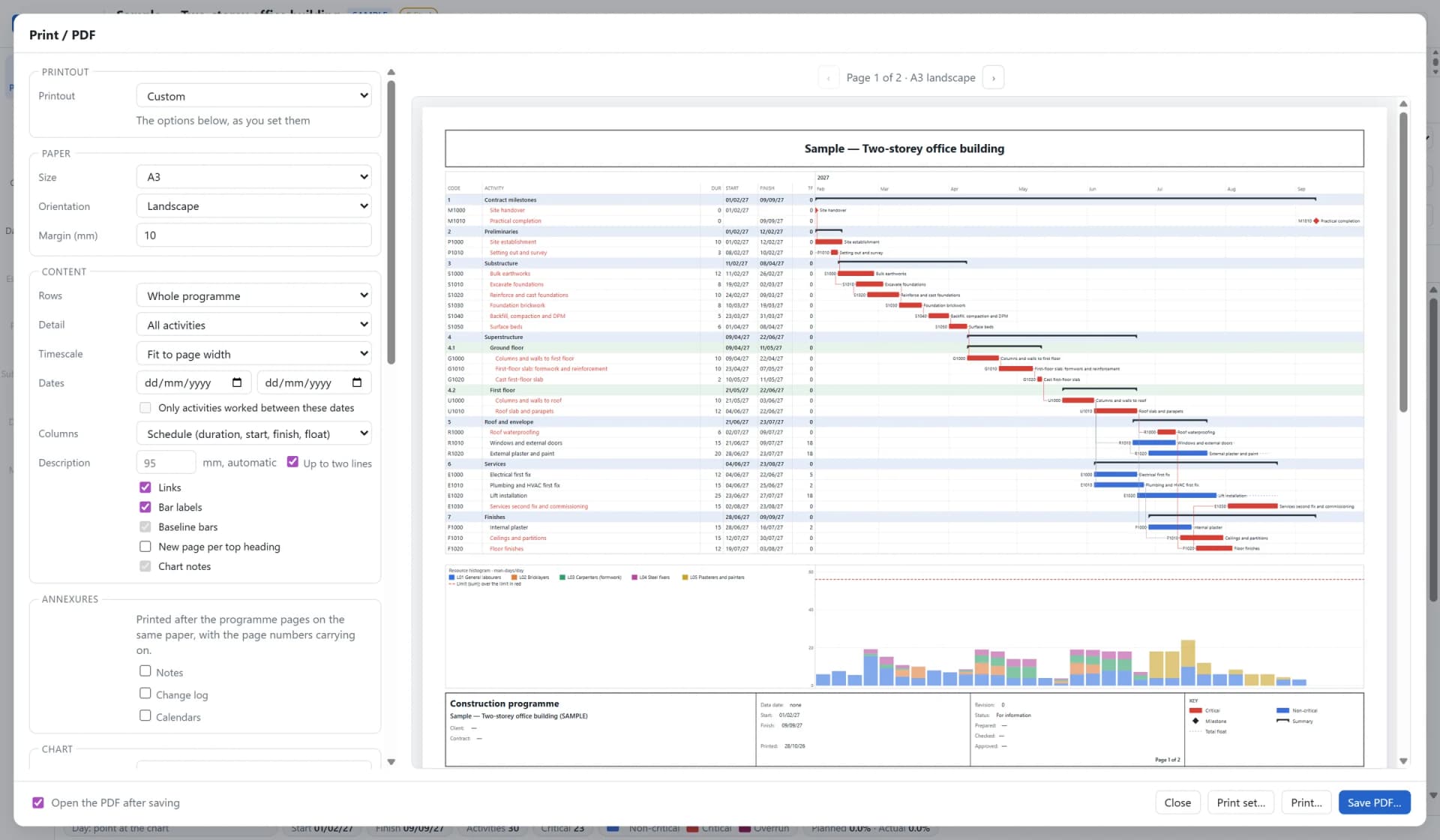
01 / 06 · Planning
Grid and Gantt chart
How it works
One file carries the programme through the job: every baseline, update and analysis stays with it.
- Step 01
Build or bring it in
Start a new programme or import a P6 XER, an MS Project XML file or a Candy programme. Codes, calendars and logic come with it.
- Step 02
Agree the baseline
Run the quality checks, then lock the agreed programme as a baseline. Keep as many baselines as the job needs.
- Step 03
Update every period
Move the data date, record actual dates and remaining durations, and keep a snapshot of each update.
- Step 04
Report
Print the monthly pack: the Gantt chart, histograms, S-curves, earned value and the change log, on any paper size or as PDF.
- Step 05
Show why time was lost
Register the events, run the analyses and issue the extension-of-time report, with the programme as its appendix.
Proof, not promises
Scheduling software is only useful if its dates can be trusted. These are the checks behind Gantt CSS.
Matches a real Candy schedule
The scheduling engine is checked against a real CCS Candy export, activity for activity.
Agrees with Microsoft Project
Seven programmes calculated by Microsoft Project are rescheduled and checked against Project’s own dates.
Round trips checked in Project itself
Exports to Microsoft Project are opened in Project and compared task by task with the programme they came from.
Used on client work
Gantt Planning plans and updates its own client programmes in Gantt CSS, so problems are found on real jobs first.
FAQ
Something else on your mind? Ask it in the form and we will answer it with the demo.
What is Gantt CSS?
Gantt CSS is construction scheduling software made by Gantt Planning, a South African construction planning consultancy. It builds and updates critical-path programmes, keeps baselines and progress updates, and carries out delay analysis for extension-of-time claims.
Can Gantt CSS open Primavera P6 and Microsoft Project files?
Yes. It imports and exports Primavera P6 XER files and Microsoft Project XML files, keeping dates, durations, lags and calendars as they are. It can also update an open programme from one of these files and list every change before it is applied.
Can I bring my CCS Candy programmes across?
Yes. Gantt CSS reads Candy planning programmes from .CCS job backups or straight from the Candy data folder, without changing the original files.
Which contracts does the delay analysis support?
Contract set-up covers JBCC PBA, GCC 2015, NEC3, NEC4, FIDIC 1999 and FIDIC 2017. Notice periods and time bars are counted in working days on the contract calendar, and the rules can be edited to match the particular conditions of your contract.
Which delay analysis methods are included?
Windows analysis, time impact analysis with fragnets, as-planned versus as-built and collapsed as-built. The results can be combined into one extension-of-time report as a PDF, with the programme as an appendix.
Does it run on a Mac or in a browser?
Gantt CSS is a Windows desktop application. It is installed on your computer and does not run in a web browser.
Do I need an internet connection, and where are my programmes stored?
Planning works offline. Programmes are saved as files on your own computer or network and are never uploaded. The licence checks in when Gantt CSS starts and once a day, and keeps working offline for up to 30 days between checks.
How is Gantt CSS licensed and priced?
As a yearly subscription for each named user, who may run it on two PCs. Every update is included while the subscription runs, and a 14-day trial is available. Prices and how to buy are on the pricing page.
Is estimating included?
Planning is the module in use today. Estimating is the next module in development, followed by commercial control (valuations, forecasts and cash flow) and site modules such as subcontracts and the drawing register.
Request a demo
Tell us a little about your work and we will arrange a walkthrough. You are welcome to bring a P6, MS Project or Candy file.
- 1
You send the form
It goes straight to the Gantt Planning team.
- 2
We reply by email
To set a time that suits you.
- 3
We walk you through it
On the sample programme or a file of yours.